Digital signage software
Every screen in every store, updated from one place.
Upload your images and videos, arrange them into playlists, and schedule what plays on each TV by location and time of day. No store visits, no USB sticks.
Runs on an Amazon Fire TV Stick plugged into any TV.
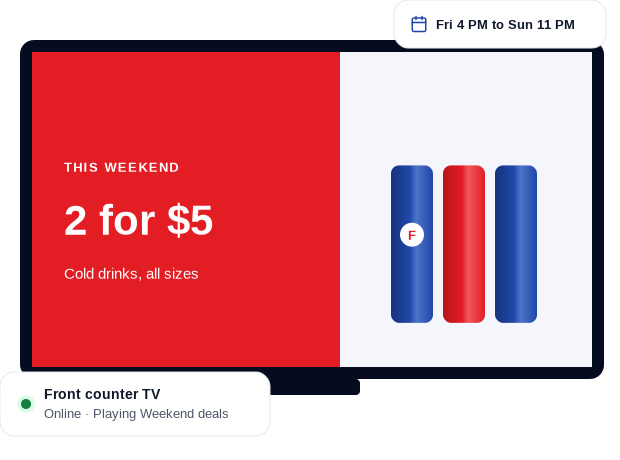
Pair with a 6 character code
No keyboard or app login on the TV.
Keeps playing offline
Content is stored on the device.
Alerts when a TV goes dark
An email after 15 minutes offline.
Your data stays yours
Every company is fully separated.
How it works
From a blank TV to your content in three steps
-
1
Plug in and open the Player
Connect a Fire TV Stick to the TV and open the fastrac-sign Player. It shows a pairing code on screen.
-
2
Enter the code in your dashboard
Name the screen, pick its location, and it appears in your screen list straight away.
-
3
Choose what it plays
Assign a playlist, add schedules for promotions, and push the update. The TV picks it up within seconds.
Content
One library for every image and video
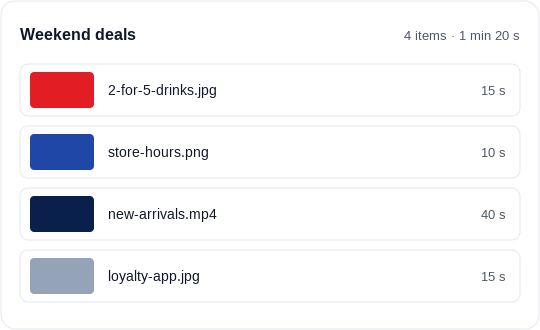
Upload in bulk, sort into folders, and build playlists by dragging items into order. Set how long each image shows and how slides change.
- Images and videos, checked and ready to play
- Folders, favorites and a 30 day Trash
- One playlist can run on many screens
Scheduling
The right message at the right hour
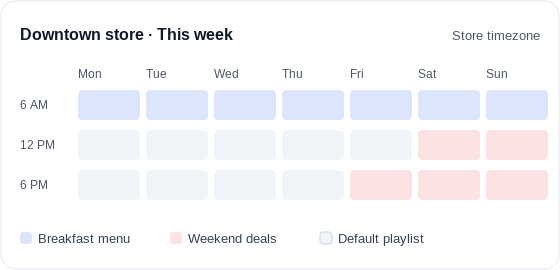
Run a breakfast menu every morning, a promotion for one weekend, or a holiday campaign with start and end dates. Each location follows its own timezone, and when nothing is scheduled the screen falls back to its default playlist.
Explore schedulingMonitoring
Know every screen is on, without walking the floor
See which screens are online, what each one is playing and any playback errors. If a TV stops checking in, your admins get an email, and another when it is back.
Explore monitoring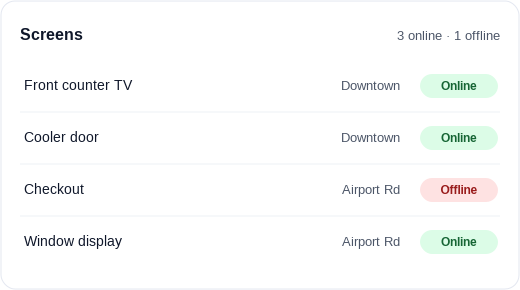
Industries
Built for businesses with screens in many places
Frequently asked questions
What hardware do I need?
Any TV with an HDMI port and an Amazon Fire TV Stick. Install the fastrac-sign Player on the stick and it is ready to pair.
What happens if the internet goes down?
Screens keep playing the content and schedules they already downloaded. They pick up any changes once they reconnect.
Can I give my team different access?
Yes. Admins manage screens, locations and people. Content Managers handle media, playlists and schedules only.
Which file types can I upload?
JPG, PNG and WebP images, and MP4 video. Each file is checked after upload so you know it will play.
How do I get started?
Book a demo. We set up your account, and you can pair your first screen the same day.
See your own content on a screen in 20 minutes
Book a short demo and we will walk through pairing, playlists and schedules with your stores in mind.